Building an AI Voice Cloning Web App with Next.js and Speechify
Clone a voice from a browser upload, synthesize speech with it, and keep your API key server-side. A working Next.js voice cloning app built on the Speechify API, no GPU required.

You can build a working voice cloning web app in Next.js with three server routes: POST /api/consent-challenge issues the phrase the speaker reads aloud, POST /api/clone takes an audio sample plus that consent recording and returns a voice_id, and POST /api/speak synthesizes text with that id. The clone is usable on the very next request. No GPU, no model files, no fine-tuning queue.
Most people build this the hard way. They pull down an open-source model, rent a GPU, lose an afternoon to CUDA versions, and then find that inference latency makes the whole thing useless for anything a user waits on. The Speechify API does the cloning for you over HTTP, so the interesting part of the app becomes the part you actually care about: the UI, and keeping your key off the client.
This walkthrough builds that app. The finished code is in demos/next-voice-cloning-app, and you’ll need a Speechify key on a plan that includes cloning. Grab one here if you don’t have it yet.
What voice cloning takes: two API calls
You create a consent challenge for the speaker, record them reading its phrase, and POST that recording together with an audio sample of the same person. The API returns a voice_id. Every future synthesis call with that id produces audio in the cloned voice, and the clone persists on your account until you delete it. There is no separate “is the model ready” poll, which is the thing that surprised me most the first time I ran it. The clone is live on the next request.
The sample does the heavy lifting. Ten to thirty seconds of clean, single-speaker speech, no music, minimal background noise. Phone audio works but gives you a phone-quality clone, so this is the one place where the input matters more than anything you do in code. I cover the create, use, delete lifecycle in more depth in the dynamic video narration post if you want the REST-level view first.
The setup
Start an app and add the SDK:
npx create-next-app@latest voice-clone-app --typescript --app
cd voice-clone-app
npm install @speechify/api
Put your key in .env.local. Next.js loads it into the server runtime, and because we only read it inside route handlers, it stays off the client:
SPEECHIFY_API_KEY=your_key_hereThat is the whole reason the clone runs in a route handler instead of the browser. The key lives on the server, the browser only ever talks to your own API. Here is the shape of it.
Voice cloning web app
The browser talks to your own Next.js route handler. That handler holds the Speechify key and makes the upstream call, so the key is never in client JavaScript.
- BrowserUpload + consentUser picks a sample and records the consent phrase; both go up together.
POST /api/clone - Next.js route handlerHolds the keyReads
SPEECHIFY_API_KEYfrom the server environment and calls the SDK.client.voices.create() - Speechify APIClones the voiceReturns a
voice_idthe app uses for later synthesis.POST /v1/voices
The voice_id travels back to the browser, but the key does not. Every later synthesis call goes back through /api/speak the same way.
Capturing the voice sample in the browser
Two ways in. The simplest is a file input, so the user hands you a .wav or .mp3 they already have:
"use client";
import { useState } from "react";

export function SampleUpload({ onFile }: { onFile: (f: File) => void }) {
  return (
    <input
      type="file"
      accept="audio/*"
      onChange={(e) => {
        const file = e.target.files?.[0];
        if (file) onFile(file);
      }}
    />
  );
}
If you’d rather record in-app, MediaRecorder captures from the mic and gives you a Blob you can treat exactly like an uploaded file:
const stream = await navigator.mediaDevices.getUserMedia({ audio: true });
const recorder = new MediaRecorder(stream);
const chunks: Blob[] = [];

recorder.ondataavailable = (e) => chunks.push(e.data);
recorder.onstop = () => {
  const sample = new File(chunks, "sample.webm", { type: "audio/webm" });
  // send `sample` to your clone route
};

recorder.start();
// ...later
recorder.stop();
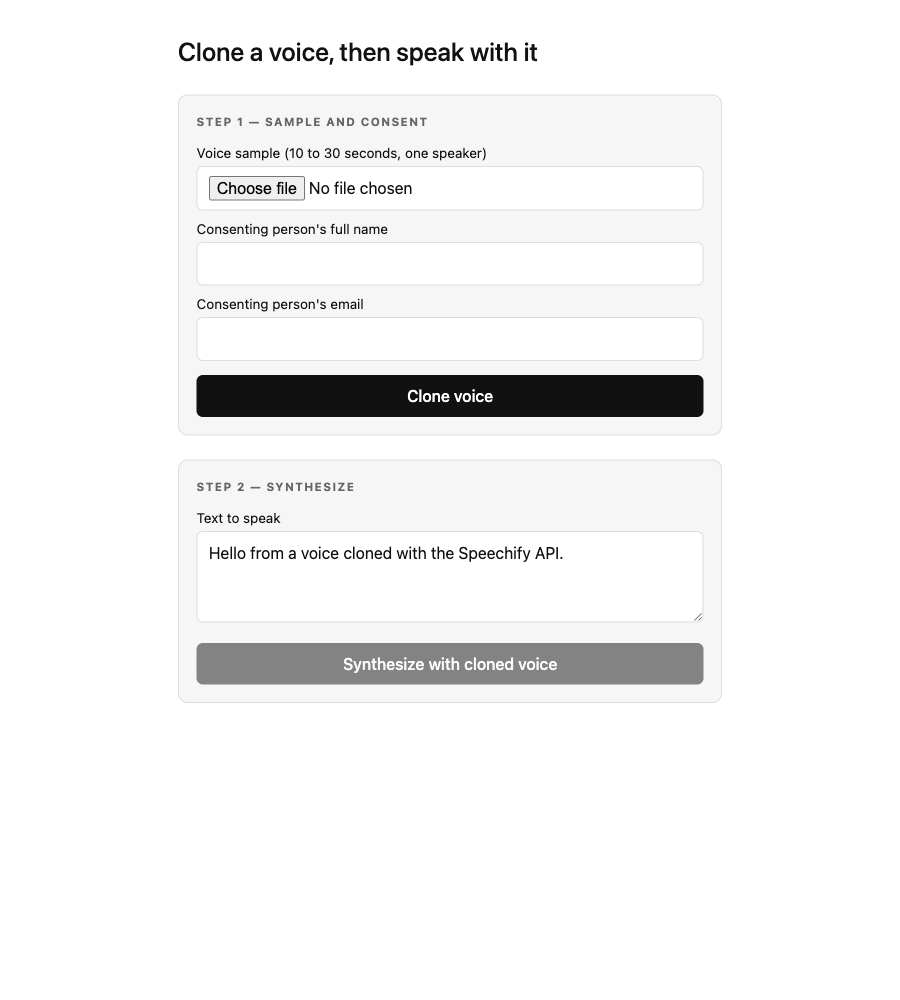
Either way you end up with a File. The same recorder captures the consent recording in the next section. Here is the app on first load, before any of that happens:
Consent is verified, not asserted
Before a voice is cloned, the speaker proves it’s theirs by reading a phrase Speechify issues. Voice cloning is the most obvious abuse vector in the whole API, and that recording is the consent record that separates legitimate use from someone scraping a podcast. A third route creates the challenge with the speaker’s full name and hands the phrase to the browser:
// app/api/consent-challenge/route.ts
import { NextResponse } from "next/server";
import { SpeechifyClient } from "@speechify/api";

export const runtime = "nodejs";

const client = new SpeechifyClient({ token: process.env.SPEECHIFY_API_KEY });

export async function POST(req: Request) {
  const { fullName } = await req.json();

  if (typeof fullName !== "string" || fullName.trim() === "") {
    return NextResponse.json({ error: "fullName is required" }, { status: 400 });
  }

  const challenge = await client.voices.consentChallenges.create({ full_name: fullName });
  return NextResponse.json({
    challengeId: challenge.id,
    phrase: challenge.phrase,
    expiresAt: challenge.expires_at,
  });
}
Show phrase to the speaker exactly as it comes back, then record them reading it with the same MediaRecorder code as above. The recording is transcribed and matched against the phrase, so don’t re-word or re-punctuate it. Three rules decide whether it passes:
- Same person as the sample. The speaker reading the phrase has to be the voice being cloned.
- 5 to 30 seconds, at most 25MB. Any common audio container works, including the
webmthatMediaRecorderproduces. - One challenge, one attempt. A challenge is single use and expires at
expiresAt, so create it when the speaker is ready to record, not when the page loads.
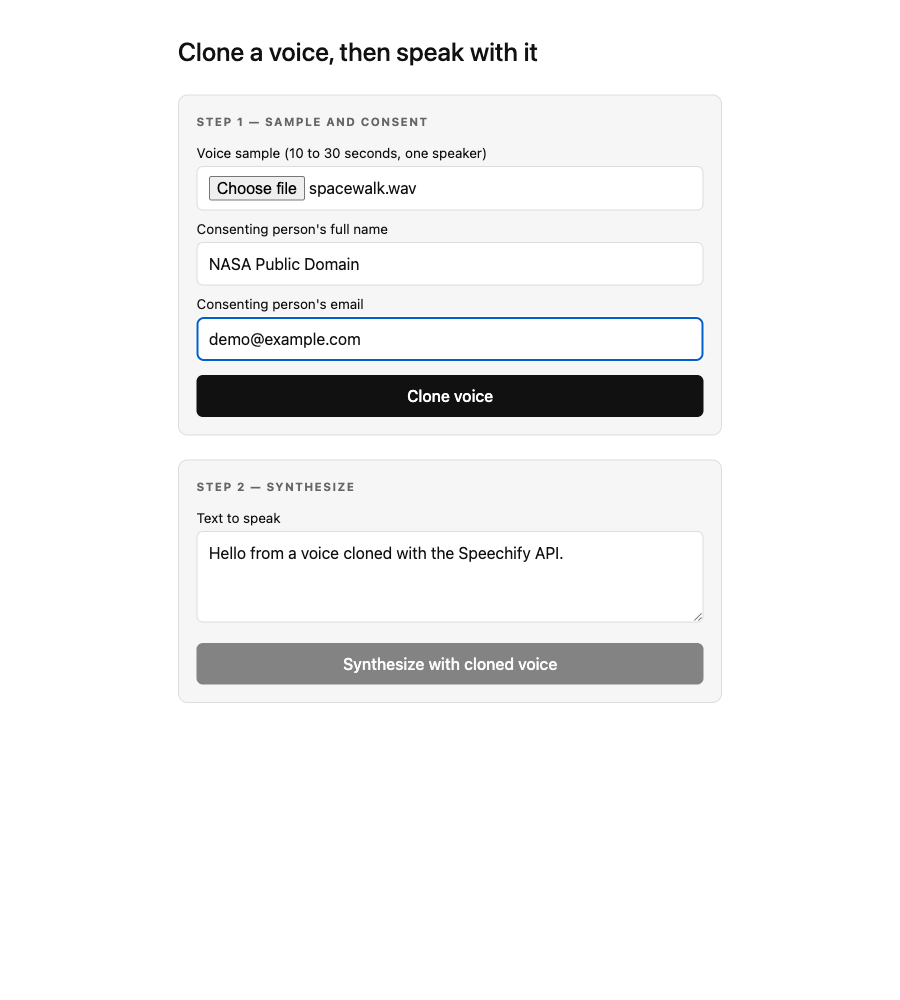
For local testing, clone your own voice and read the phrase yourself, so consent is unambiguous.
The clone route
The server handler receives the sample, the consent recording and the challenge id as FormData, passes them to client.voices.create, and returns the new id. The key is read from the server environment and never serialized back:
// app/api/clone/route.ts
import { NextResponse } from "next/server";
import { SpeechifyClient, SpeechifyError } from "@speechify/api";

export const runtime = "nodejs";

const client = new SpeechifyClient({ token: process.env.SPEECHIFY_API_KEY });

export async function POST(req: Request) {
  const form = await req.formData();
  const sample = form.get("sample");
  const consentRecording = form.get("consentRecording");
  const consentChallengeId = form.get("consentChallengeId");

  if (!(sample instanceof File) || !(consentRecording instanceof File) || typeof consentChallengeId !== "string") {
    return NextResponse.json(
      { error: "sample, consentRecording and consentChallengeId are required" },
      { status: 400 },
    );
  }

  try {
    const voice = await client.voices.create({
      name: `clone-${Date.now()}`,
      gender: "male",
      sample,
      consent_challenge_id: consentChallengeId,
      consent_recording: consentRecording,
    });
    return NextResponse.json({ voiceId: voice.id, displayName: voice.display_name });
  } catch (err) {
    if (err instanceof SpeechifyError && err.statusCode === 402) {
      return NextResponse.json(
        { error: "Voice cloning isn't included in your current plan." },
        { status: 402 },
      );
    }
    if (err instanceof SpeechifyError && (err.statusCode === 422 || err.statusCode === 409)) {
      const code = (err.body as { error?: { code?: string } } | undefined)?.error?.code;
      return NextResponse.json(
        { error: "Consent was not verified. Request a new phrase and record it again.", code },
        { status: err.statusCode },
      );
    }
    throw err;
  }
}
Three things earn their place here. The SDK’s sample and consent_recording fields accept a web File directly, so a browser upload goes straight through without you writing it to a temp file first. The 422 and 409 branch carries the reason consent failed. A 422 is consent_phrase_mismatch (the recording doesn’t say the phrase), consent_speaker_mismatch (a different person read it) or consent_recording_unusable (silence, or too little or too much speech). A 409 is consent_challenge_expired or consent_challenge_already_used. Either way the challenge is spent, so the browser calls /api/consent-challenge again and the speaker records the new phrase; the sample is still good. And that 402 branch is real. Voice cloning is plan-gated, and if your plan doesn’t include it the API returns voice_cloning_not_included. I hit that exact 402 on two of my own keys while building this, so branch on err.statusCode === 402 and show the user something useful instead of a stack trace.
client.voices.create returns { id, display_name, type, ... }. The id is what every later synthesis call needs.
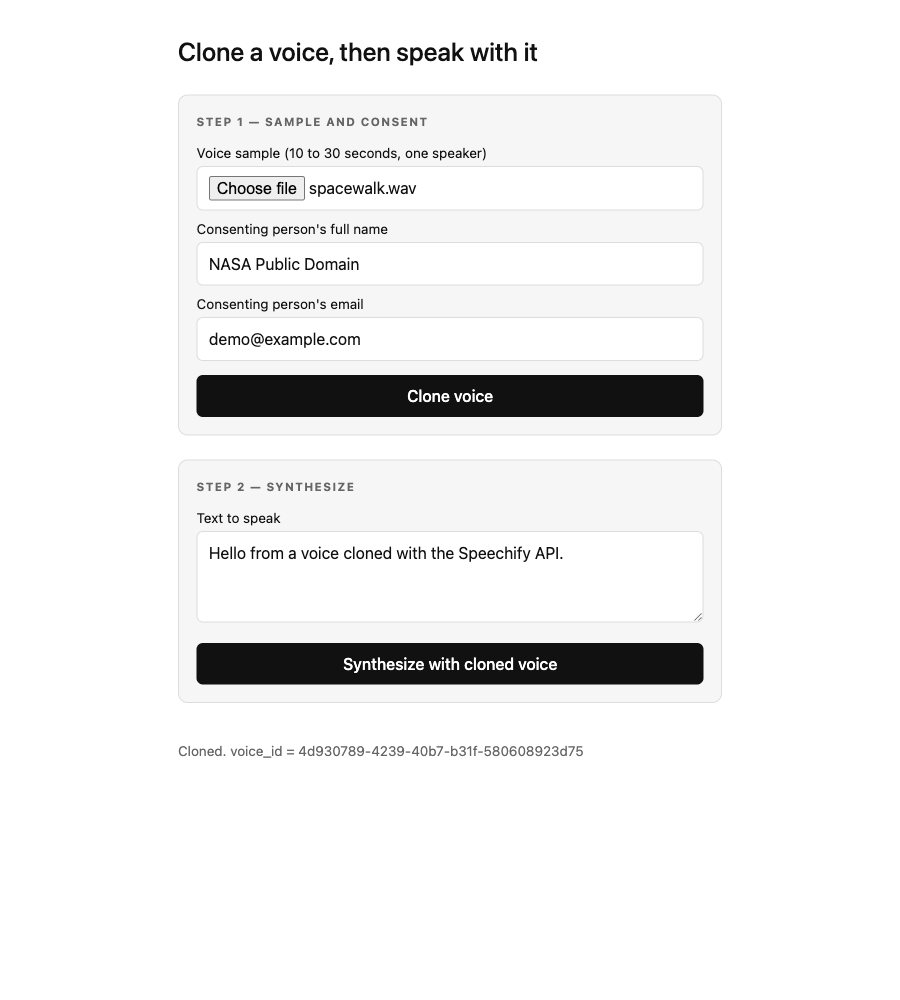
voice_id. Step two is now enabled, so the same id can be used to synthesize.Synthesizing with the cloned voice
Once the client has a voiceId, synthesis is a second route, and it’s the same call you’d make for any catalogue voice. The cloned id just slots in where sabrina would go:
// app/api/speak/route.ts
import { NextResponse } from "next/server";
import { SpeechifyClient } from "@speechify/api";

export const runtime = "nodejs";

const client = new SpeechifyClient({ token: process.env.SPEECHIFY_API_KEY });

export async function POST(req: Request) {
  const { text, voiceId } = await req.json();

  if (typeof text !== "string" || typeof voiceId !== "string") {
    return NextResponse.json({ error: "text and voiceId are required" }, { status: 400 });
  }

  const speech = await client.audio.speech({
    input: text,
    voice_id: voiceId,
    audio_format: "mp3",
    model: "simba-3.0",
  });

  return NextResponse.json({ audio: speech.audio_data }); // base64 mp3
}
The response comes back with audio_data as base64. On the client, turn it into a playable URL and hand it to an <audio> element:
async function speak(text: string, voiceId: string) {
  const res = await fetch("/api/speak", {
    method: "POST",
    headers: { "Content-Type": "application/json" },
    body: JSON.stringify({ text, voiceId }),
  });
  const { audio } = await res.json();

  const blob = await (await fetch(`data:audio/mpeg;base64,${audio}`)).blob();
  const url = URL.createObjectURL(blob);
  new Audio(url).play();
}
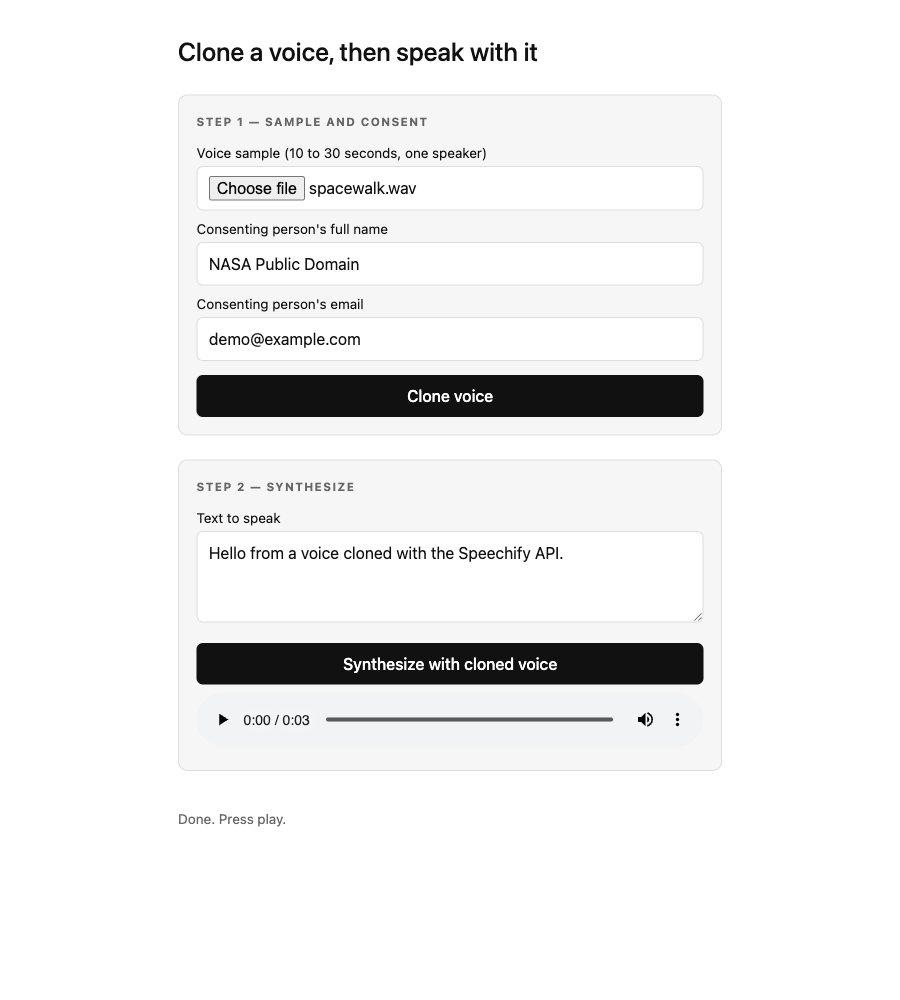
That is the full loop. Record the consent phrase and upload or record the sample in the browser, clone on the server, synthesize on the server, play back in the browser. If you’ve read the Node.js TTS post, the synthesis half is a call you’ve already made, pointed at your clone.
Cleaning up cloned voices
Clones persist until you delete them, so a multi-tenant app needs a cleanup story. The delete call takes voice_id:
// app/api/voice/route.ts
await client.voices.delete({ voice_id: voiceId });
Delete a voice when a user removes it, and store and reuse the voiceId for returning users rather than re-cloning every session. Re-cloning costs an upload and adds latency for no benefit if the voice already exists.
Where to take it next
The demo runs on simba-3.0, which serves cloned voices self-serve. For English catalogue voices, simba-3.2 is the current recommendation and serves every English voice in the catalogue — the *_32 voices are just its built-in examples, not a limit. For non-English, stay on simba-3.0. Streaming, speech marks for captions, and SSML all work with a cloned voice_id exactly as they do for any other voice.
The full runnable app is in demos/next-voice-cloning-app, the REST recipe is in the cookbook, and the parameter surface is in the Speechify docs.
FAQ
Does the API key ever reach the browser in this setup?
No. Both the clone and the synthesis run in route handlers under app/api/, which only execute on the server. The browser talks to your own /api/clone and /api/speak endpoints and never sees SPEECHIFY_API_KEY. next.config.ts also marks @speechify/api as a server-external package, so the SDK is never bundled into client JavaScript.
How do I pass a browser-uploaded file to the SDK?
The SDK’s sample and consent_recording fields accept a web File directly, which is what a multipart FormData upload gives you in a Next.js route handler. Read them with form.get("sample") and form.get("consentRecording"), confirm each is a File, and pass them straight into client.voices.create. There’s no need to write the upload to disk or convert it to a stream first.
What if the consent recording is refused?
The create returns 422 with a code that says why: consent_phrase_mismatch, consent_speaker_mismatch or consent_recording_unusable. An expired or already used challenge returns 409 instead. The challenge is spent either way, so create a new one and record the new phrase. The sample is still good. Outside a few accounts on an existing agreement, a create that still sends the old consent field instead of a challenge returns 400 consent_verification_required.
What happens if voice cloning isn’t on my plan?
The API returns 402 voice_cloning_not_included. The clone route catches it by checking err instanceof SpeechifyError && err.statusCode === 402 and returns a clean 402 to the client. Cloning is a billing-plan entitlement, not something a key’s scopes carry, so a “full access” key on a plan without cloning still gets the 402. Branch on the status code and point the user at pricing.
How long should the voice sample be?
Ten to thirty seconds of clean, single-speaker speech. Under ten seconds and the clone gets unreliable on prosody. Over thirty adds upload time without improving quality. If you record with MediaRecorder, give the user a fixed paragraph to read so you get consistent length and content every time.
Which model should I use to synthesize with a cloned voice?
Use simba-3.0, which is what the demo does and serves cloned voices self-serve across the languages it covers. A cloned voice lists the models it supports in the create response. simba-3.2 can also synthesize an English clone — self-serve for every workspace, no enablement step — so match the model to what the voice actually lists; for a non-English clone, stay on simba-3.0.
This post is narrated by Harper on Simba 3.2 through our text to speech API. How the player works: add read-aloud to your docs and turn speech marks into captions.