Speech generation in the Vercel AI SDK with Speechify
How a Speechify provider for the AI SDK's generateSpeech() works: a dependency-free speech model that maps POST /v1/audio/speech onto SpeechModelV4, key held server-side in a Next.js route. Speechify now maintains one on npm, @speechify/ai-sdk-provider.

The Vercel AI SDK has a generateSpeech() function, and Speechify maintains a provider for it, @speechify/ai-sdk-provider. You don’t strictly need one. A speech model in the AI SDK is just an object with a doGenerate() method, so you can write a custom model that maps generateSpeech() onto Speechify’s POST /v1/audio/speech in about a hundred lines, with no extra dependency. This post builds that model and wires it into a Next.js page.
I built this against ai@7.0.34 and @ai-sdk/provider@4.0.3 on Next.js 16. The whole thing is in demos/ai-sdk-speechify-speech, running against the live API. If you want a key to follow along, grab one here.
Why build a provider instead of calling the API directly
Fair question. You can call POST /v1/audio/speech with fetch and skip all of this. If your app already speaks HTTP to Speechify, keep doing that.
The reason to wrap it is that you’re already inside the AI SDK. You’re calling generateText and generateObject, your code passes models around as values, and you want speech to look the same as everything else: generateSpeech({ model, text }), one shape, swap the model to change vendor. A provider buys you that uniformity, whether you install Speechify’s or keep your own file. It’s the same argument as the speech-sdk provider post: meet the code where it already is.
What a speech model has to return
generateSpeech() in AI SDK core takes a model, some text, and options like voice and outputFormat. The model does the work in one doGenerate() call. The interface is SpeechModelV4 from @ai-sdk/provider, and the parts that matter are the identifiers and that one method:
import type {
  SpeechModelV4,
  SpeechModelV4CallOptions,
  SpeechModelV4Result,
} from "@ai-sdk/provider";
doGenerate() receives the call options (text, voice, format, and a few settings), and returns the audio plus some metadata. That’s the whole contract. Everything below is mapping Speechify’s request and response onto it.
AI SDK + Speechify
Your code calls the AI SDK's generateSpeech(). The custom model's doGenerate() turns that into an HTTP call. Speechify returns base64 audio. The key stays in the route handler the whole way.
- Next.js route handlerCalls generateSpeech()Reads
SPEECHIFY_API_KEYfrom the server environment and asks the SDK for speech.generateSpeech({ model, text, voice }) - Custom speech modeldoGenerate()Maps
voicetovoice_id, setsmodel: simba-3.2, and posts with plainfetch.POST /v1/audio/speech - Speechify APISynthesizesReturns
audio_data(base64),billable_characters_count, andspeech_marks.{ audio_data, ... }
The audio comes back to the browser as a data URL. The key does not. The provider file is imported only by the route handler, so it never lands in client JavaScript.
The custom speech model
Here is the core of the provider. It’s plain fetch, no SDK, so it drops into any runtime that has fetch:
// app/lib/speechify-provider.ts
import type {
  SharedV4Warning,
  SpeechModelV4,
  SpeechModelV4CallOptions,
  SpeechModelV4Result,
} from "@ai-sdk/provider";

const DEFAULT_BASE_URL = "https://api.speechify.ai";

export function createSpeechify(settings: { apiKey?: string; baseURL?: string } = {}) {
  const baseURL = settings.baseURL ?? DEFAULT_BASE_URL;

  function speech(modelId: string): SpeechModelV4 {
    return {
      specificationVersion: "v4",
      provider: "speechify",
      modelId,

      async doGenerate(
        options: SpeechModelV4CallOptions,
      ): Promise<SpeechModelV4Result> {
        const apiKey = settings.apiKey ?? process.env.SPEECHIFY_API_KEY;
        if (!apiKey) throw new Error("Missing Speechify API key.");

        const { text, voice, outputFormat, language } = options;
        const warnings: SharedV4Warning[] = []; // populated in the next section

        const body = {
          input: text,
          voice_id: voice ?? "harper_32",
          audio_format: outputFormat ?? "mp3",
          model: modelId,
          ...(language ? { language } : {}),
        };

        const res = await fetch(`${baseURL}/v1/audio/speech`, {
          method: "POST",
          headers: {
            Authorization: `Bearer ${apiKey}`,
            "Content-Type": "application/json",
          },
          body: JSON.stringify(body),
          signal: options.abortSignal,
        });

        if (!res.ok) {
          throw new Error(
            `Speechify POST /v1/audio/speech responded ${res.status}: ${await res.text()}`,
          );
        }

        const data = await res.json();

        return {
          // The endpoint returns base64; the spec says to pass audio
          // through in whatever encoding the API used.
          audio: data.audio_data,
          warnings,
          request: { body },
          response: { timestamp: new Date(), modelId },
          providerMetadata: {
            speechify: {
              audioFormat: data.audio_format,
              billableCharactersCount: data.billable_characters_count ?? null,
              speechMarks: data.speech_marks ?? null,
            },
          },
        };
      },
    };
  }

  return { speech };
}

export const speechify = createSpeechify();
Two mapping decisions worth calling out. Speechify’s voice_id is the AI SDK’s voice, so that’s a straight rename, and language passes through under the same name. And POST /v1/audio/speech returns base64 audio inside a JSON envelope, not raw bytes, so doGenerate() passes data.audio_data straight through. The AI SDK spec says to return the audio in whatever encoding the API produced, and the SDK exposes both .base64 and .uint8Array on the result, so the consumer picks.
The interesting fields ride along in providerMetadata. POST /v1/audio/speech returns more than audio: a billable_characters_count and a full speech_marks object. There’s nowhere for those in the generic generateSpeech() result, so they go under providerMetadata.speechify where anyone who wants them can read them.
Handling the settings the API doesn’t have
generateSpeech() can pass speed, instructions, and language. Speechify’s /v1/audio/speech takes language as a field of its own, which the snippet above already sends, but it has no top-level speed or instructions. The honest thing is to warn rather than silently drop those two. Push into the warnings array from the snippet above for each one that’s set:
if (options.speed != null) {
  warnings.push({
    type: "unsupported",
    feature: "speed",
    details: "Use an SSML prosody rate in the input text instead.",
  });
}
if (options.instructions) {
  warnings.push({
    type: "unsupported",
    feature: "instructions",
    details: "Speechify controls delivery with SSML in the input text, not a free-text instruction field.",
  });
}
Because the model already returns that array, these surface on result.warnings. The caller sees precisely which of its options had no effect, instead of wondering why speed: 1.5 did nothing.
Wire it into a Next.js route
The key stays server-side. The provider file is imported only by a route handler, so it’s never bundled into client JavaScript, and SPEECHIFY_API_KEY never reaches the browser. Without a gate, that route is a free proxy onto a paid API: anyone who finds the URL can burn through billable characters on your key, and a solved Turnstile challenge only proves a human is calling once, not that they won’t call again immediately. The demo checks a Cloudflare Turnstile token, bounds requests per IP, and rejects text over Speechify’s own 2000-character input limit, all before calling generateSpeech():
// app/api/speech/route.ts
import { NextResponse } from "next/server";
import { generateSpeech } from "ai";
import { speechify } from "../../lib/speechify-provider";
import { verifyTurnstile } from "../../lib/turnstile";
import { rateLimit } from "../../lib/rate-limit";

export const runtime = "nodejs";

// Matches the server-side cap on GetSpeechRequest.input.
const MAX_TEXT_LENGTH = 2000;

// Turnstile proves a human solved a challenge once; it doesn't cap how many
// paid requests that same caller sends afterward.
const RATE_LIMIT = { max: 5, windowMs: 60_000 };

export async function POST(req: Request) {
  if (!(await verifyTurnstile(req))) {
    return NextResponse.json({ error: "Forbidden" }, { status: 403 });
  }

  if (!rateLimit(req, RATE_LIMIT)) {
    return NextResponse.json(
      { error: "Too many requests. Wait a minute and try again." },
      { status: 429 },
    );
  }

  const { text, voiceId } = await req.json();

  if (typeof text !== "string" || typeof voiceId !== "string") {
    return NextResponse.json(
      { error: "text and voiceId are required" },
      { status: 400 },
    );
  }

  if (text.length > MAX_TEXT_LENGTH) {
    return NextResponse.json(
      { error: `text must be ${MAX_TEXT_LENGTH} characters or fewer` },
      { status: 400 },
    );
  }

  try {
    const result = await generateSpeech({
      model: speechify.speech("simba-3.2"),
      text,
      voice: voiceId,
    });

    return NextResponse.json({
      audio: result.audio.base64,
      mediaType: result.audio.mediaType,
      warnings: result.warnings,
      providerMetadata: result.providerMetadata,
    });
  } catch (err) {
    // doGenerate() throws a plain Error on any non-2xx from Speechify (bad
    // voice/model, rate limit, upstream 5xx). Uncaught, that crashes the
    // route with a bodyless 500 and the caller never learns why.
    const message = err instanceof Error ? err.message : "Speech generation failed.";
    return NextResponse.json({ error: message }, { status: 502 });
  }
}
That’s the payoff for the wrapping work. generateSpeech({ model: speechify.speech("simba-3.2"), text, voice }) reads like every other AI SDK call. The browser solves a Turnstile challenge, posts text plus the token to /api/speech, and gets audio back. verifyTurnstile() (in the demo’s lib/turnstile.ts) posts the token to Cloudflare’s siteverify endpoint and only lets the request through on a real pass. rateLimit() (in lib/rate-limit.ts) tracks a small in-memory window per IP, five requests a minute, so passing Turnstile once isn’t a license to call the route on repeat. The length check rejects an oversized request locally instead of spending a call on one POST /v1/audio/speech would 400 anyway, and the catch turns an upstream failure into a real error message instead of an opaque 500.
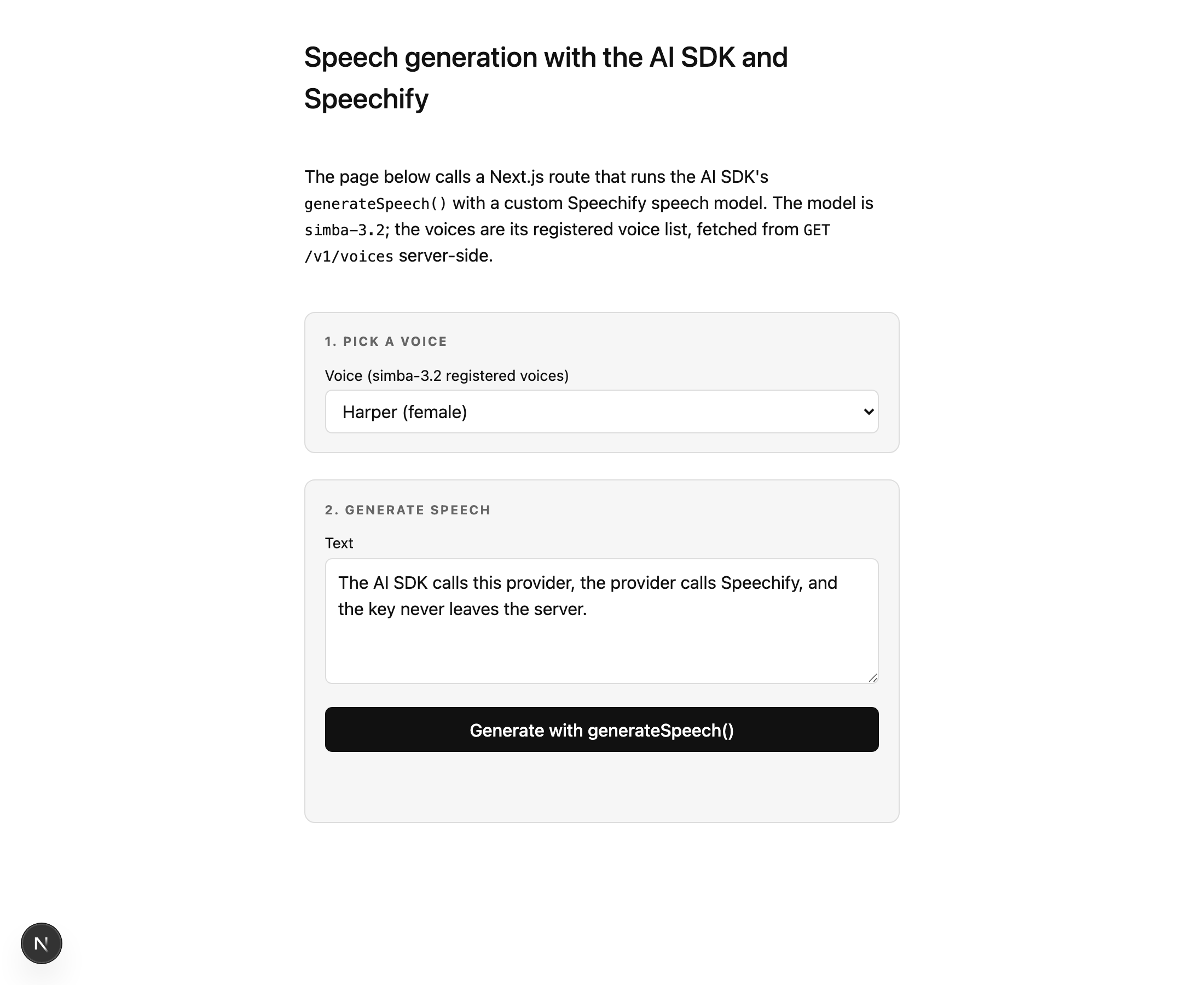
GET /v1/voices server-side, showing simba-3.2’s eight built-in voices as a starting selection.Populate the voice picker from GET /v1/voices
simba-3.2 serves every English voice in the catalogue, so you can show the full English roster; this demo shows its eight built-in *_32 voices as a compact starting selection. A second route fetches the catalog server-side and returns the display names for those voices. Note the response envelope: since the June 2026 catalog change, GET /v1/voices returns an object with a voices array, next_cursor, and has_more, not a bare array. Read data.voices, not data:
// app/api/voices/route.ts
import { NextResponse } from "next/server";

export const runtime = "nodejs";

const SIMBA_32_BUILTIN_VOICES = [
  "beatrice_32", "dominic_32", "edmund_32", "geffen_32",
  "harper_32", "hugh_32", "imogen_32", "wyatt_32",
];

function fallback() {
  return NextResponse.json({
    voices: SIMBA_32_BUILTIN_VOICES.map((id) => ({ id, display_name: id })),
  });
}

export async function GET() {
  const apiKey = process.env.SPEECHIFY_API_KEY;
  if (!apiKey) return fallback();

  try {
    const res = await fetch("https://api.speechify.ai/v1/voices", {
      headers: { Authorization: `Bearer ${apiKey}` },
    });
    if (!res.ok) return fallback();

    const data = await res.json(); // { voices, next_cursor, has_more }
    const catalog = new Map((data.voices ?? []).map((v) => [v.id, v]));

    return NextResponse.json({
      voices: SIMBA_32_BUILTIN_VOICES.map((id) => ({
        id,
        display_name: catalog.get(id)?.display_name ?? id,
        gender: catalog.get(id)?.gender ?? null,
      })),
    });
  } catch {
    return fallback();
  }
}
When the demo runs, that call returns display names and genders for these eight built-in voices, a starting selection from the full English roster simba-3.2 serves: Beatrice, Dominic, Edmund, Geffen, Harper, Hugh, Imogen, Wyatt. If the key is missing, the request fails, or the response isn’t OK, fallback() returns the raw id list so the page still works.
What comes back
Press generate and the page plays the audio, then shows what the SDK returned. Here is a real run against the live API, synthesizing a 98-character sentence:
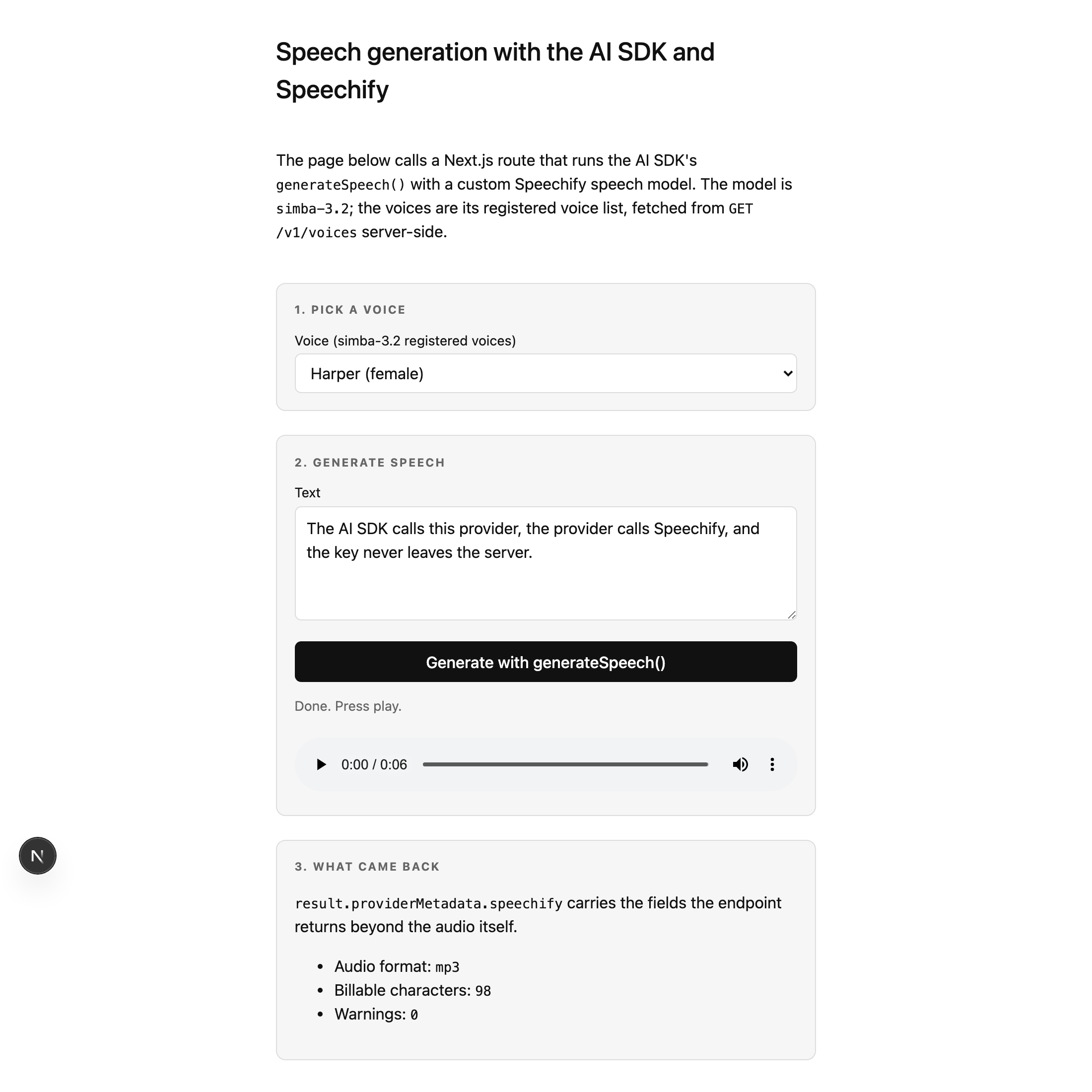
generateSpeech() result. The player is fed a base64 data URL; the panel below reads the fields off result.providerMetadata.speechify.The metadata panel reads straight off providerMetadata.speechify. For that run the endpoint reported billable_characters_count: 98 and an mp3 format, with no warnings because the route passes only text and voice. The speech_marks object rides along too, keyed by character offset and time (times are in milliseconds), with a chunks array carrying one entry per word:
{
  "audioFormat": "mp3",
  "billableCharactersCount": 98,
  "speechMarks": {
    "type": "sentence",
    "start": 0,
    "end": 98,
    "start_time": 0,
    "end_time": 6579,
    "value": "The AI SDK calls this provider, the provider calls Speechify, and the key never leaves the server.",
    "chunks": [
      { "type": "word", "start": 0, "end": 3, "start_time": 0, "end_time": 171, "value": "The" }
    ]
  }
}
If you want to turn those marks into synced captions, that’s the speech marks captions post.
Where this breaks, and what to reach for instead
generateSpeech() is request/response. It waits for the whole clip, then returns it. For anything a user waits on, like a conversational turn, you want the first audio bytes as early as possible, and that’s POST /v1/audio/stream, not this. The Web Audio streaming post covers that path. This custom model is the right tool when you’re generating a clip and playing it back, not when latency to first byte is the number you’re optimizing.
The other edge is model and voice pairing.
simba-3.2 serves every English voice but is English-only, so a non-English voice_id returns an error rather than audio.
For other languages, use simba-3.5: it speaks 48 languages under one model id, with every catalog voice.
The demo populates the picker from GET /v1/voices; if you build your own selector, read each voice’s models array so you only offer voices the model supports.
If you’d rather not maintain that file, install @speechify/ai-sdk-provider: it is the same idea with every option mapped, speed included, and Speechify maintains it. Either way, when a later model lands you change the string you pass to speech().
FAQ
Does the Vercel AI SDK have an official Speechify provider?
Speechify maintains one: @speechify/ai-sdk-provider on npm, with its source in the Speechify-AI/ai-sdk-provider repository on GitHub. Install it with npm install @speechify/ai-sdk-provider ai and pass speechify.speech("simba-3.2") as the model. The @ai-sdk/* packages are Vercel’s own, so a vendor-maintained provider like this one ships under the vendor’s npm scope. If you’d rather own the code, a speech model is any object implementing the SpeechModelV4 interface from @ai-sdk/provider, so a custom provider is a single file with one doGenerate() method that calls POST /v1/audio/speech.
How do I return Speechify’s base64 audio from doGenerate()?
POST /v1/audio/speech returns audio as a base64 string in audio_data, inside a JSON body. Return that string directly as the audio field of the SpeechModelV4Result. The AI SDK’s spec says to pass audio through in whatever encoding the API used, and it exposes both result.audio.base64 and result.audio.uint8Array to the caller, so you don’t decode it yourself.
Where do billable_characters_count and speech_marks go?
The generic generateSpeech() result has no field for them, so put them under providerMetadata.speechify. The response from /v1/audio/speech includes billable_characters_count and a speech_marks object alongside the audio, and providerMetadata is the AI SDK’s escape hatch for exactly this kind of vendor-specific data. The caller reads them off result.providerMetadata.speechify.
How do I pick a valid voice for simba-3.2?
simba-3.2 serves every English voice in the catalogue; the eight *_32 ids are just its built-in voices.
It’s English-only, so a non-English voice_id returns an error.
Use simba-3.5 there: it takes every catalog voice, in 48 languages.
Fetch GET /v1/voices server-side and read each voice’s models array to keep the English voices the model supports.
Does the API key stay off the client in this setup?
Yes. generateSpeech() and the provider both run inside app/api/* route handlers, which execute only on the server. The provider file is imported by those handlers, never by a client component, so it isn’t bundled into browser JavaScript, and SPEECHIFY_API_KEY is read from the server environment. The browser only ever talks to your own same-origin routes.
The full runnable demo is in demos/ai-sdk-speechify-speech, and the endpoint reference is in the Speechify docs.
This post is narrated by Harper on Simba 3.5 through our text to speech API. How the player works: add read-aloud to your docs and turn speech marks into captions.